
Submit your meter reading from your mobile phone.
Sol Plaatje residents can use the portal to capture a clear photo of the meter, enter the current reading, and submit it for municipal review in a few guided steps.
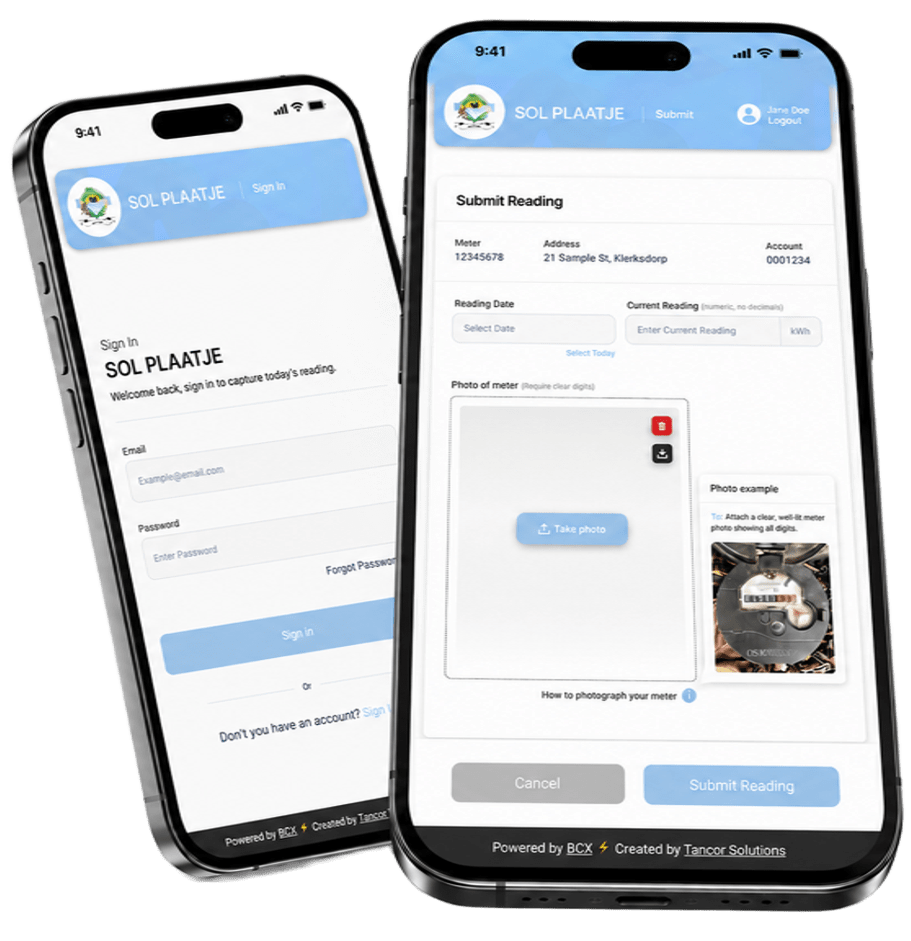
Follow these steps to submit your reading
The process is designed to guide you from sign-in to submission using your phone browser, with no additional app required.
Sign in to your account
Use your account details to sign in. If you are a first-time user, register first so your meter account can be linked to the portal.
Enter the reading and add a photo
Select the reading date, type in the meter reading exactly as shown, and upload a clear photo where all digits are visible.
Submit for review
Check the information, submit it to the municipality, and monitor the status of the reading in your portal history.
A simple way to submit the correct reading on time.
Submitting your own reading helps the municipality process your monthly account using the most current information available, while giving you a clear record of what was sent.
Access portal ->Use your phone
Open the portal in your mobile browser and complete the process from wherever you are.
Submit clear proof
A readable meter photo supports your entry and helps the review process.
Track your submission
View whether your reading is pending, approved or declined after submission.
Avoid missing details
The guided process helps you include the reading date, meter value and image before sending.
What you'll need
Submitting within the open reading period helps the municipality process your latest meter information on time.
Access portal ->Frequently asked questions
Support is available if you need assistance.
Contact the support team for help with registration, sign-in or submitting a mobile meter reading.